|
Getting your Trinity Audio player ready...
|
How to Upload eBook to Amazon KDP (Complete Guide)
Well, let’s admit it, completing the writing and the subsequent editing process is only the beginning. Once your manuscript is complete, the last thing you’d like is running into an obstacle when submitting it to a publishing house. The positive side is that once you get familiar with the process, the process of uploading your eBook on Amazon KDP is fairly simple. This guide will show you exactly how to upload an ebook to amazon kdp without confusion. Just a few clicks of the mouse, and you’re done.
This tutorial was created for those readers who do not want to read a hundred threads or watch a forty-minute video just to find the answer to a question that seems easy. In this tutorial, we will discuss all stages, starting from creating your account and finishing at the very end pressing the “publish” button in such a way that even your grandma can follow these instructions.
Before proceeding to the next point, there is one fact that should be taken into consideration: Amazon KDP is absolutely free of charge. You pay no fee for the registration process, for listing your eBook on its platform, for marketing activities, or anything else. Amazon KDP is simply the most efficient tool for self-published authors.
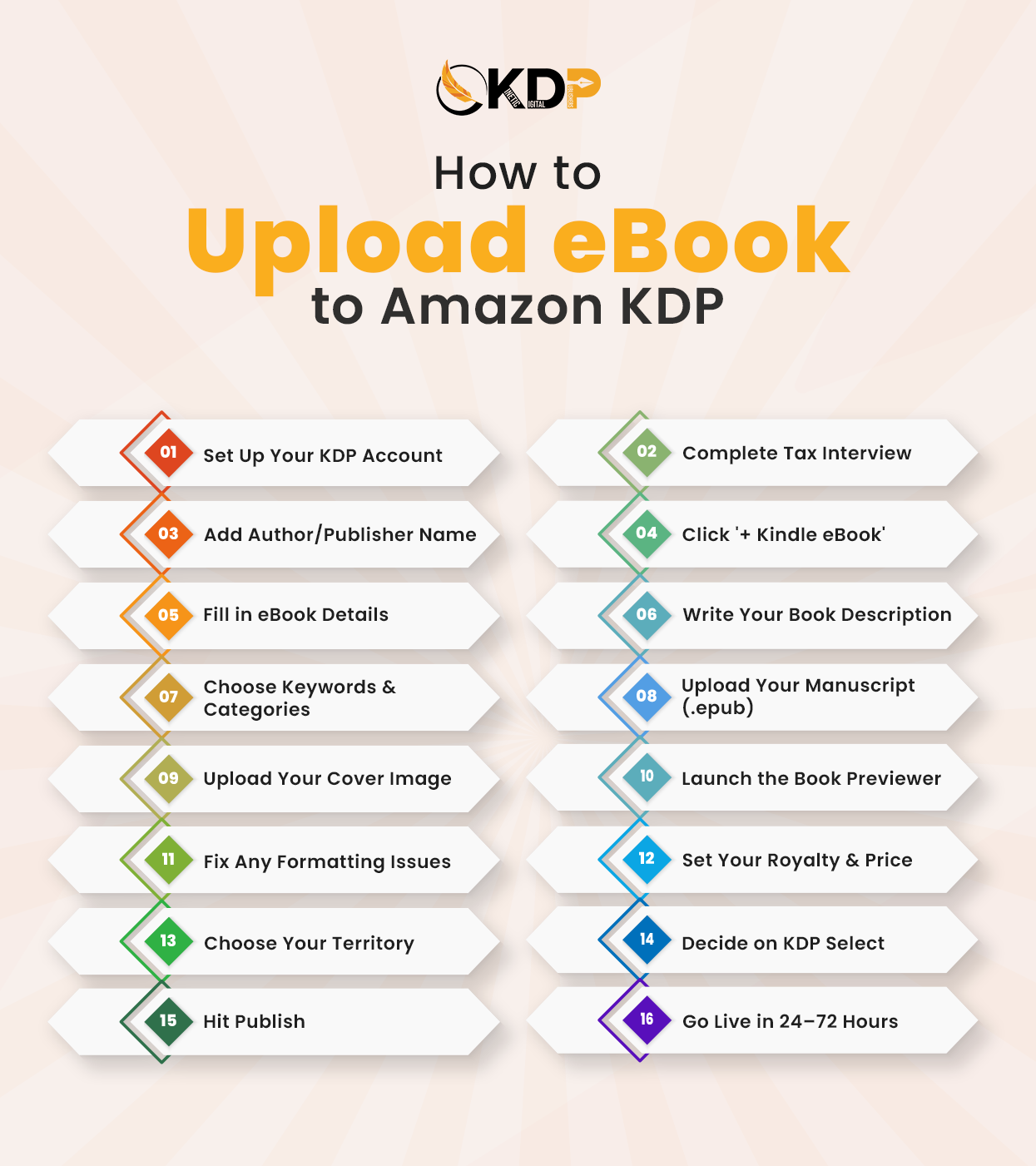
What You Need Before You Even Log In (Amazon KDP eBook Guide)
Many beginners tend to go ahead and start working on their KDP dashboard without being fully prepared, and as a result, they often find themselves interrupted in the middle of the process by something simple, like finding an appropriate file or creating their own book description. The preparation process is not complicated and will take only about ten minutes to get everything ready.
Your most important file is obviously your manuscript. While Amazon KDP allows you to submit your manuscript in a variety of files, including .docx, .pdf, .html, .mobi, and others, the one that you should choose is .epub because it offers you more flexibility and gives you better control over your final product. If you have a manuscript created in Microsoft Word, Kindle Create, which can be easily downloaded from the Amazon website, will come in handy for the task.
The second file that you’ll need is your book cover image. According to Amazon, the recommended dimension for the image would be 2,560 x 1,600 pixels, in either JPG or TIFF format. Most new writers tend to neglect the power of the cover image because a poor quality cover image can prevent a potential buyer from reading your book description. As you can see, making an investment into your book’s cover prior to publication is a smart idea.
Apart from files themselves, there are several other things you should think about before you submit the book for publication. The best way to start is by having your book title and subtitle ready along with your description of the book. Also, you’ll need to decide upon 7 keywords and two categories in order to increase your chances of being listed on Amazon more successfully.
Creating Your KDP Account and Getting It Set Up
In case you are using the Amazon account as a consumer, Prime, etc., then you could reuse the same login credentials for KDP. Just visit kdp.amazon.com, log in, and the site would help you through the short set-up process; however, do remember that there are two key points which you need to cover first.
First is your author/publisher name. The name displayed on your book page or on your author page can either be your real name or a pen name. Whatever you choose, just ensure that it is exactly what you want, since it might not be easy for you to change it later on.
The next one is the tax interview. It doesn’t sound easy, but it is pretty simple. It’s just a short quiz for Amazon to establish whether you’re a US-based author or not. In order to give out royalties, Amazon needs this information as a legal obligation. Most users complete this step within five minutes or even less. After completing both steps above, you will be redirected to the Bookshelf – the starting point of your authoring career on KDP. Click on ‘+ Kindle eBook’ and that’s it!
Walking Through the Three KDP Tabs in the KDP Upload Process
Everything regarding the process of creating an ebook using KDP is structured into three tabs, namely: Kindle eBook Details, Kindle eBook Content, and Kindle eBook Pricing. All these have their specific function, and none of them is overly complex compared to how they appear on the surface.
Tab 1 — Kindle eBook Details
This section serves as the equivalent of putting up the storefront for your book. Any information visible on your book’s page on Amazon such as its title, your name as the author, the description, and categorization will be inputted on this tab.
Begin by listing your book’s basic information including its language, title, and subtitle. If it belongs to a series, you can enter it in the appropriate space. Also, put down your author name in the way that you would like it to appear on the product page, and if your work has any other contributor such as a co-author or illustrator, mention their names in this section.
Your book description requires more attention than most writers pay to it. It should not just provide a neutral explanation of the contents of your book. Rather, it should serve as a sales pitch to your potential readers. You only have about two sentences to grab their interest. Start with the most exciting element of your book – whether it is a question, a statement, or something that poses tension. In writing nonfiction books, start with the problem faced by your readers and suggest how your book can solve it.
For publication rights, if the book is yours and you have not agreed to any form of contract, check “I own the copyright and have the relevant publishing rights.” Simple enough.
Then keywords, and you’ll get seven boxes to play around with. But here’s the thing keywords are much more important than the average person realizes. They aren’t simply genre labels. Try thinking from the perspective of your exact target reader and consider what they might search for online. “Thriller” is a little too broad; instead, think along the lines of “fast-paced legal thriller with female protagonist.” Make use of all seven boxes.
Categories are the same; you’ll want to think about placing your book precisely to reach your audience better. Amazon has an extensive category system, and the better you can hone in on your category, the greater your chances of being found by the right person. You get two selections; spend some time looking over the possibilities first.
Tab 2 — Kindle eBook Content
This is the section where you will upload your ebook onto Amazon KDP: your manuscript document, your cover art, and your choice of Digital Rights Management (DRM).
In terms of DRM, you will have the ability to turn this feature on or off. What DRM does is make sure that your book cannot be copied without permission. Most traditional authors choose to leave this feature turned on, while independent authors often choose to turn it off.
Your manuscript is processed and transformed into the Kindle format during the upload process. It takes only a few minutes for Amazon to process your file. The next step is to click the “Launch Previewer” button, which you must do regardless of how tempting it may be to skip ahead. Launch the previewer and check your manuscript yourself. Examine the formatting, chapter divisions, and table of contents. Look at the different screen sizes available via the previewer and see how they affect the layout. Remember, if there are errors in the previewer, there will be errors when someone downloads your book.
The last step of this tab is to upload the cover image of your book. Click “Upload your cover file”, choose an image file, and allow Amazon to process it.
Tab 3 — Kindle eBook Pricing
This is where the real self publishing ebook amazon talk happens, and this is where you will set your royalty model and the price point for your book.
There are two royalty models available on KDP. The 70% royalty will apply if your book is priced anywhere from $2.99 to $9.99, and this is where you should try to be if you plan on self-publishing an eBook. It provides a solid royalty rate while also making sure that your book is affordable enough. If your book does not fall within this range, you will earn 35% royalties.
In terms of territories, ‘All Territories’ will be the easiest option for most authors because this enables your book to become accessible in all Amazon stores around the world with zero additional work. For those authors who own rights to their work globally, there is really no reason not to choose that option.
Then there is an option for KDP Select enrollment which locks your eBook on Amazon only for a period of 90 days in return for listing your book on Kindle Unlimited (meaning your work can be accessed by Kindle Unlimited subscribers) and participating in free or countdown promotions. It might be something worth considering depending on whether you are trying to build an audience and maximize Amazon exposure or if you are publishing on several other platforms at the same time.
After You Hit Publish — What Actually Happens
Immediately after clicking on “Publish Your Kindle eBook,” Amazon will conduct a review on the file you submitted. This process can take anything from 24 to 72 hours, after which you will be sent an email confirming the publication of your eBook. It is all live.
What naturally comes into your mind now is taking a rest since you think everything is done. Well, not quite. You can access a direct link to your listing through the Amazon KDP dashboard. As soon as your book has been listed, make sure you post about it online via social media platforms. Send the link to anyone in your social network who might be interested in downloading your work. This initial stage of promotion plays an important role in ranking the book in Amazon’s recommendation system.
Also consider taking a little time out to set up your Amazon Author Central profile, if you don’t have one yet. The Amazon Author Central profile allows you to include a brief bio, a photograph of yourself, and even link your personal blog. Your books are linked to one another here by your single author identity, giving you an author profile.
The Mistakes That Catch First-Time Authors Off Guard
In the world of self-publishing via the Amazon KDP ebook guide space, there are a lot of authors who have done most of everything correctly yet encountered issues mostly due to the fact that they made some very simple mistakes that can be easily avoided.
Not utilizing the book previewer seems to be the most typical one. This step tends to feel like it isn’t necessary until you learn of the formatting problems that are revealed through its use but aren’t noticeable while writing the actual book. The incorrect placement of page breaks, varying font size, and not starting the chapters on their own pages are just a few of the issues that will appear during this process.
Writing a book description is another example of an area where authors put in less effort than needed. The majority of the descriptions that are initially written tend to resemble summaries and lack excitement or any kind of inspiration. For a book description to make a sale, it should begin with an emotional or dramatic statement that draws attention, appeal directly to the customer, and end with a call to action.
Keywords either become overly broad or entirely random. Authors choose one-word keywords such as “romance” or “business” and expect that their book will come up when people search those terms. In addition, the seven keyword slots are designed for phrases, not individual words. Consider your ideal reader carefully and write what they would write to search for your book.
Lastly, authors do not spend enough time choosing appropriate categories. Taking just five more minutes on Amazon’s Category Explorer tool to select the most accurate and specific category for your book could make all the difference, especially in a niche category where there is no competition.
Getting Your Book Seen After Publishing
The publication of your eBook is just the beginning point. The real action happens as soon as your book is available online, getting in front of potential readers.
KDP Free Promotion, if you participate in the KDP Select program, allows you to make your book free for up to five days within each 90-day window of your enrollment. With a good promotion through just a few newsletters or social media postings about your free week, it’s possible to get hundreds of downloads, leading in many cases to a number of reviews and an increase in your book’s ranking. Amazon Ads, if applied properly, is a valuable channel for driving traffic, starting with a modest budget and focused on your keywords.
If we leave the confines of Amazon, then having a website for yourself as a writer will provide a long-term platform where people can find more information about your other works and join your mailing list. In addition, having an email list of your supporters and followers is one of the most powerful instruments an indie author can create.
If you are interested in checking out professional marketing campaigns tailored exclusively for self-publishers, then the book marketing services would definitely save you a lot of effort by getting your book into the hands of people who are searching for something just like that.
One Thing That Can Make or Break Your eBook Launch
One thing few upload guides will tell you is that even if your eBook is flawlessly formatted, up on Amazon at a reasonable price point, and everything else is just right, that doesn’t guarantee sales. In many cases, it’s simply a matter of marketing strategy, a strategy that is easy to miss if you’re too invested in your book. But rest assured that Kinetic Digital Publishers can assist you with that, too!
Whether you want help with eBook publishing support, which will cover all your formatting and uploading needs, or if you’re ready to take it a step further and go for full-fledged book marketing services, we’ve got the resources you need. It’s much better to have experts keeping an eye out on those keywords and making sure your book ends up in the right place than finding out six months later that everything you’ve done hasn’t been effective.
You don’t have to go through all of this by yourself. If you want to bypass the guesswork stage and do things right the first time around, get in touch with our publishing staff and we’ll determine exactly what your book requires.
You’re a Lot Closer Than You Think
Understanding the correct way to upload an ebook to amazon kdp makes the entire publishing journey easier for first-time authors.
It all seems like a lot once you break it down. The new dashboard, the tabs you don’t understand, royalty splits and keywords, and territories; it all amounts to a big list when you put it on paper. But on the inside, it’s one screen at a time. Enter the information you need, upload what you can, and then proceed.
The very first publish will take the longest, but by your second attempt, you’ll already be familiar with the process. And after the third time, you’ll be doing it like clockwork.
But if you prefer to leave the entire kdp upload process to the experts – Kinetic Digital Publishers is your answer. We cover every aspect of eBook publishing as well as book marketing services geared towards independent authors. Contact us today through our publishing team and let’s get those books out there!
FAQs
Q1. How do I start the process to upload an eBook to Amazon KDP for the first time?
Firstly, you must log into the website kdp.amazon.com using the Amazon account you already have. Make sure to fill out your author name and tax information interview since royalties will not be disbursed until both are completed. After setting up your account, you can proceed to “+ Kindle eBook” on your Bookshelf and navigate through the three pages namely; Details, Content, and Pricing page. Make sure you have everything you need before starting.
Q2. What is the best file format when uploading an eBook to Amazon KDP?
The .epub file is considered to be the best choice when it comes to uploading an ebook to the kindle. This format maintains formatting on all Kindle formats without any problem at all. There are other acceptable formats, including .docx, .pdf, .html, and .mobi, but the best quality will always be provided by .epub files.
Q3. How long does Amazon take to review and publish my eBook after I submit it?
In most instances, your eBook will be reviewed and published by Amazon between 24 to 72 hours after submitting it. You will get a notification once the publishing process begins. Sometimes it may take some extra time due to some kind of content or format issue, and that’s the reason why it’s advisable to preview it first.
Q4. Can I make changes to my eBook after it’s already live on Amazon?
Yes, you can make changes to your manuscript, cover, description, keywords, categories, and prices whenever you wish through the KDP dashboard. This usually takes anywhere between 24 and 72 hours once the changes are submitted again. However, if you’re on the KDP Select program, then there may be some limitations if you’re already within the 90 days period.
Q5. Do I need a lot of money to publish an eBook on Amazon KDP?
Answer: No. The service of kdp ebook publishing itself is absolutely free, as there are no initial charges to register on the website, upload the book, and make it available for purchase. Amazon makes its profit via commission, which it takes from every sale made via the royalty system. What most authors pay for is professional book cover design, editing, and formatting before uploading it, and these are all direct determinants of the book’s success.