|
Getting your Trinity Audio player ready...
|
How to Publish a Book Using Amazon Kindle Direct Publishing Step by Step
The book has been written. It has been edited until you were sick of it and reread countless times. And you are wondering now, what’s next? Well, here’s the good news: the process of publishing your book on Amazon doesn’t seem as daunting as you imagined. Using Amazon Kindle Direct Publishing, any author, regardless of whether he/she is a beginner, a professional, or somewhere between, can easily publish an actual book and reach the audience without spending a fortune and wasting years trying to get accepted by a traditional publisher. That’s why Amazon Kindle Direct Publishing is the most popular choice for modern authors.
In this guide, you’ll learn all the steps that you need to follow to self-publish your book. There will be absolutely no technical language, and everything will be explained clearly to guarantee that you fully understand how to proceed.
And now a piece of information to motivate you – you don’t need a publishing degree, a huge budget, or even knowledge of the technology in order to accomplish this goal. Thousands of new authors successfully publish their books using Amazon Kindle Direct Publishing every month. Some of them have never even uploaded anything in their life before that.
The one thing that sets KDP apart from all the other options is the amount of power it gives you as an author. The time when your book will be published is up to you. Your price is determined by you. You fully own your rights as well. The best part is that when you need to change anything about your book, such as the cover, the description, or the price, you don’t have to ask for anybody’s permission to do so.
What Is Amazon Kindle Direct Publishing and Why Should You Use It
KDP is Kindle Direct Publishing through Amazon, which can be shortened to KDP. It is an entirely free publishing service provided by Amazon. It allows people to upload their books to its website and distribute them for sale without going through publishers and literary agents.
You retain ownership rights to your book. You determine the pricing. You earn a royalty fee on every sale. Your book will be accessible to millions of readers worldwide. If you have already finished writing your book manuscript and would like it to be read by people instead of collecting dust on your hard drive, then there is no publishing site for you other than Amazon KDP.
What You Need Ready Before You Start the KDP Upload Process
Before going ahead with your book publication on the KDP website, it would be prudent to get yourself prepared for the entire process. In most cases, not getting oneself prepared for the process will lead to the need to pause in the middle due to some necessary files being missing.
The following items should be sorted out before you go ahead with the Kindle publishing process:
Manuscript (preferably in .epub or .docx format)
Cover of the book (minimum of 2,560 x 1,600 pixels), either in JPG or TIFF formats
Title and subtitle, and the description of the book
Seven different keywords related to the book
Two different categories from Amazon related to the book
Login details of the Amazon site and the tax details
In case your manuscript is not yet prepared to upload, it would be wiser to get an expert manuscript prepared for the online publishing process.
Step One — Create Your KDP Account
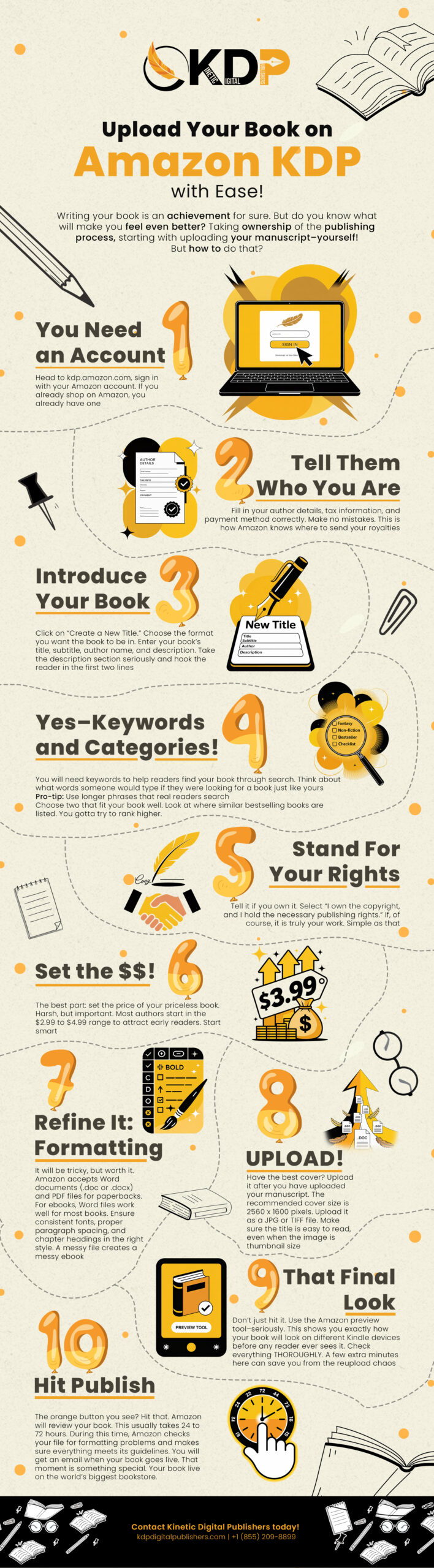
Go to kdp.amazon.com and sign in by using your usual Amazon login details. Since you have made purchases from Amazon before, you already have everything you need to gain access to the website.
Next, you will undergo an easy account setup where you will provide the name under which you want to publish the book and your tax information. This is just a quick survey that will confirm your tax situation as Amazon is going to make payments to you, which will only take five minutes. Alternatively, you can hire professional publishing experts who will help you set up your KDP account.
Step Two — Start a New Title on Your Bookshelf
After you’ve set up your account, you’ll be directed to your KDP Bookshelf page. This is the main page where all your books will be stored after being published. Clicking on the “+ Kindle eBook” button if you’re publishing an eBook, or clicking on the “+ Paperback” button if you’re publishing a paperback, starts the procedure to publish a book on Amazon KDP.
This article will focus on publishing an eBook since it’s faster. You can always publish the paperback edition after you’ve published your eBook. This is one of the most important stages in the Amazon Kindle Direct Publishing process.
Step Three — Fill In Your eBook Details
Book Title and Description
On the first tab, you get to create the listing for your book. This is basically the webpage that people will view if they click on your book on Amazon. Here, you have to put down the actual title of the book along with the subtitle, if the book has any. You now need to enter the name of the author.
However, you can put other names as well in case there were multiple authors to the book or some editor helped out. The most important aspect of the tab is the description of the book. It is not a summary but an attempt at selling the book. You need to capture people’s attention right from the start. Think about what makes the book unique.
Keywords and Categories
The number of keywords to use is seven. Remember to use all the allotted spaces. Do not use generic keywords like “fiction” or “business.” Rather, choose keywords that people might enter into a search engine while searching for something similar to your content.
In terms of categories, you have two choices to make. Go through all the categories and select the ones applicable to your book. Proper categorization will help your book rank high on Amazon’s search engines, and having your book rank high in certain categories will help you establish yourself as an author quickly. This step plays a major role in optimizing your Amazon Kindle Direct Publishing listing.
Step Four — Upload Your Manuscript and Cover
Uploading the Manuscript
Select “Upload eBook Manuscript” and upload your file. The best format for rendering your book properly on the KDP site is the EPUB format, as it works perfectly on all devices and readers. While Amazon accepts a few other formats like .docx, the epub format will work better for you.
Your document will be automatically converted once it is uploaded to Amazon. The conversion process may take from one to two minutes. After that, you will see a preview option on your screen, and you need to use it. It shows you the exact way your eBook will look on different kinds of Kindles. Please check if there are any mistakes regarding spacing and formatting.
Uploading the Cover
“Upload your cover file,” and then select your picture. This is the first thing that people will see when they come across your book, not your book title or the description. When they find that your cover is fuzzy and not professional, there is a great possibility that people won’t read your writing at all.
In case you still haven’t decided on what the cover of your book should look like, it’s high time to take care of it. There are ways to make your cover interesting and professional enough. A properly formatted file ensures smooth performance on Amazon Kindle Direct Publishing devices.
Step Five — Set Your Pricing and Royalty Structure
This is where you get to decide the selling price of your book, as well as the amount of income you will make from each book that is purchased. Amazon KDP provides authors with two options when selecting their royalty rates.
Where the book is sold at a price range of between $2.99 and $9.99, authors get to keep 70% of the profit from the sale of each book. This is usually the preferred royalty rate by many authors who publish their work, since they are able to make substantial income from each book, and the price is acceptable to buyers. Where a book costs less or more than the mentioned price, the income made is 35%.
In the case of territory selection, ‘All territories’ should be selected if the author owns copyright in all countries around the world. This implies that the book will be made available to all stores across the globe on the Amazon website without doing anything further. Moreover, the author gets to select whether to sign up their work to the KDP Select program or not. At this stage, your Amazon Kindle Direct Publishing setup is complete and ready to go live.
Step Six — Hit Publish and Wait for Your Book to Go Live
All you have to do now, after completing all three tabs–details, content, and pricing–is to hit the button “Publish Your Kindle eBook”. After submitting your book to Amazon, they will review it, and in 24 to 72 hours, most of the books will go live. As soon as this happens, you will get an email from Amazon notifying you about the same.
Now that you’ve done this, your book will get its very own page on Amazon with its purchase button, images, and description. This is your published book.
One Thing Most KDP Tutorials Never Tell You
This is one area where most Amazon KDP tutorial videos fail to cover. Just because your book has been uploaded to Amazon does not necessarily guarantee that it will get read. If it lacks reviews, views, and advertising, then there is a chance that your book may become invisible to Amazon’s algorithms.
But with Kinetic Digital Publishers, you have access to specialists who offer assistance through every phase of the publishing journey – and not just in the upload stage. Having had experience with thousands of manuscripts, they know how to make sure that your book will get the exposure it needs to reach the readers. In short, you will never have to discover by yourself how poorly selected keywords have sabotaged your book since the beginning. Get my point?
Are you prepared to launch into action once your book gets published? Promote your book after publishing through a team that makes self-published books visible.
What Happens After Your Book Is Live on the Amazon KDP Platform
Publication is the initial step. The following weeks after the publication are essential in determining the future success of your book.
Firstly, it is necessary to promote your book by posting links to your book on Amazon in various places, such as social networks and other online forums. It will be good if people you trust will agree to give honest reviews for your book shortly after its release. Reviews will assist Amazon in recognizing good books for recommendation through their search engine.
It would be wise to set up your Author Central Page in order for Amazon to recognize all information about yourself and your books. Your Author Central Page will make your book look professional.
Thus, if authors want total assistance in publishing their books, cooperation with a publishing company will do the trick.
Common Mistakes to Avoid in the KDP Self Publishing Process
The kdp self-publishing guide world is packed with authors who have done everything right but have experienced problems, which have been caused by a few simple yet easily avoidable mistakes.
Not testing your book in the previewer is one of them. You upload your manuscript to Amazon, feel happy because your manuscript has been uploaded, and go ahead and get your book ready for publishing, only to realize later that you have made some formatting errors while you published your book. Always preview your document first.
A bad book description is another mistake many writers make. Most of them write their book descriptions as though they are writing summaries. However, an effective book description works like an advertisement that captures your potential readers emotionally so that they want to buy the book. Give yourself some time to do so.
Finally, using broad keyword phrases. Using words like novel and self-help as keywords is not helpful. Keyword phrases should be as specific as possible.
Conclusion
Amazon Kindle Direct Publishing may very well be one of the simplest things that any new writer can accomplish after they complete their manuscript. Amazon Kindle Direct Publishing makes it easy for anyone to become a published author. With a free account, just some input of information, and then the inclusion of your manuscript and images, these are the basic requirements that you need to accomplish in order to publish your book, which will become available to millions of people worldwide.
Ultimately, what matters here is preparation. Get your files ready. Write your book description. Input appropriate keywords. Pre-publish your book first. And please don’t think of publication as an end but the start of the promotional phase. With the right strategy, Amazon Kindle Direct Publishing can turn your manuscript into a global product.
If you want an experienced team behind you through the entire journey from editing and cover design to upload and promotion on the Amazon KDP platform, Kinetic Digital Publishers is here for exactly that. Reach out and let us help you publish with confidence.
FAQs
Q1. Is Amazon Kindle Direct Publishing really free to use?
Absolutely. You won’t have any costs associated with opening an account, uploading your book, and selling it. The company generates income due to the share of royalties that it gets from sales. For authors who want to publish without upfront costs, the Amazon Kindle Direct Publishing platform is one of the most accessible options available.
Q2. What is the best file format for the KDP upload process?
The .epub format gives you the cleanest, most consistent results across all Kindle devices and reading apps. Amazon also accepts .docx, .pdf, and .html, but .epub is the format most experienced authors use for the how to upload book kdp step because it translates best to the Kindle reading experience.
Q3. How long does it take for my book to go live after I submit it?
Most books go live within 24 to 72 hours after submission to the Amazon Kindle Direct Publishing steps process. Amazon reviews each submission for content and formatting before approving it. If there is a problem with your file or cover, Amazon will email you with details so you can fix and resubmit.
Q4. Can I sell my eBook on other platforms if I publish on KDP?
Yes, unless you enroll in KDP Select, which requires 90-day exclusivity with Amazon. If you skip KDP Select, you are free to sell your eBook on Apple Books, Kobo, Barnes and Noble, and anywhere else at the same time. Many authors start with KDP Select for the first 90 days and then expand to other platforms afterward.
Q5. Do I keep my rights when I publish through the Amazon KDP platform?
Completely. You retain full copyright ownership of your book. The Amazon KDP tutorial process is a distribution arrangement where Amazon provides the platform and the audience, and you keep the rights to your work. You can update, unpublish, or change your book at any time through your KDP dashboard.